


Install Google Analytics on Blogger
Wouldn’t it be nice to know how many people actually visited your blog each day? How about knowing which of your posts are the most popular? Well surprisingly Blogger doesn’t currently offer any native blog analytics but fortunately there is Google Analytics — available for free.

Google Analytics is a great tool that will show you all sorts of useful information about how people found your blog, keywords they searched on to find you, where they came from and even how long they stayed. You’ll learn more about where your visitors come from and how they interact with your blog. This is a must tool if you are trying to build a profitable blog otherwise you are flying blind!
This article will show you how to add Google Analytics to your Blogger blog. It’s a fairly simple process and doesn’t require any technical skill at all.
Step #1 – Setup a Google Analytics Account
Go to Google Analytics and sign in using your Blogger login. If your account doesn’t work for some reason, you can create a new one instead. Once you login you’ll see a screen that looks like this:

Click on the “Sign Up >>” button and proceed to the next step which will ask you for your general information. Website URL, Account Name, Country, and Time Zone. The screen will look like this:
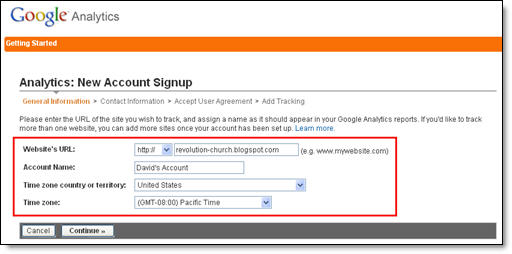
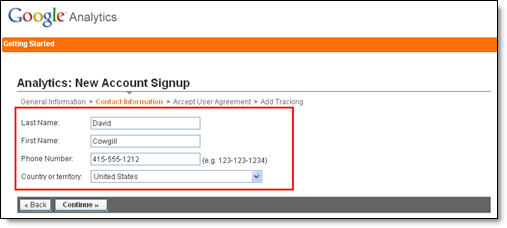
If you noticed, I just put my Blogger url (without the http://) and called it “David’s Account” because this is your top-level container for 1 or 100 different websites so it’s a good idea to name it something more general. The next step will ask you for your contact information which includes your first name, last name, phone number, and country. Easy so far right?
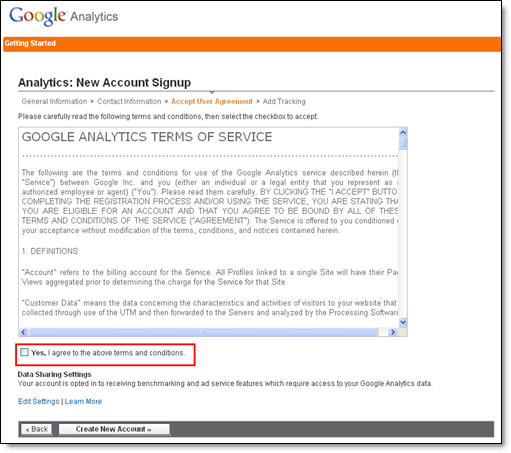
Your last step in signing up will ask you to accept the user agreement terms and conditions which you should read (just kidding…who actually ever reads these entire legal terms anyhow?).
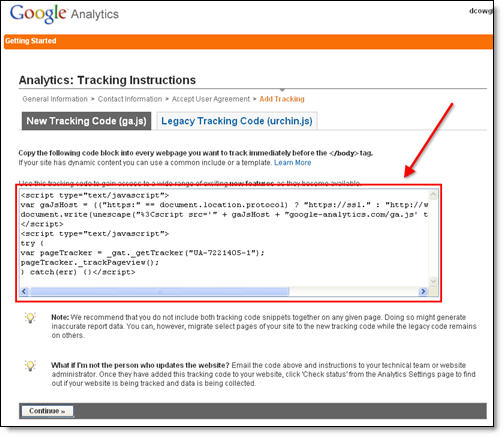
After you click on the “continue >>” button you will be taken to your brand new Google Analytics dashboard! You will see your blogger blog listed but with no analytical data….yet.
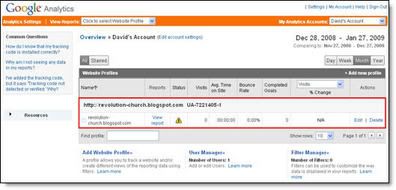
Ok, now you are done with setting up your Google Analytics account. The next step is placing the tracking code into your Blogger template so it can report back to Google Analytics and provide you with some cool data points.
Step #2 – Adding GA Tracking Code to Your Blogger Template
This is not a very difficult step even if you are afraid to touch your template code. Login to your Blogger account and then click on the “Layout” => “Edit HTML” tabs. This will bring you to the template code. Before you make any changes, I advice you to back up your template just in case there are any problems. After you’ve done so, continue reading.
Now in the edit template html code window, scroll all the way to the bottom of your template code and look for the ["/body"] tag. There should only be one of these closing tags in your template. If you can’t find it then your template wasn’t properly created and you should add one right above the [/html] tag.The [/html] tag should always be your last line of code in your template. It signifies the end of your template.
Ok, now go back to the code you saved before in a Word Doc from Google Analytics. You are going to copy it and paste it right above the [/body] tag as illustrated in the image below. The yellow highlighted code is the new GA code I just pasted into my template.
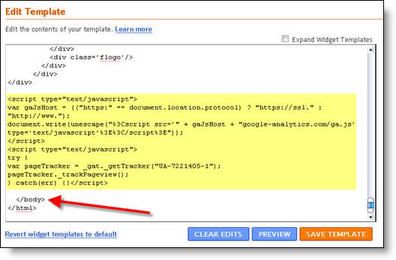
Save your template and you shouldn’t get any error messages. If you do, it’s most likely not related to this GA code and something else with your template itself. Assuming you’ve been successful with your save, you are all done embedding the GA code in your template!
Step #3 – Confirm Google Analytics is Tracking
Go back into your Google Analytics account and look at your dashboard. Most likely you will see a little yellow exclamation mark under the “status” column that looks like this:
 . This means everything isn’t working properly yet which is fine because we are about to tell GA we just added the code. From your dashboard, click on the “edit” link which is located to the far right.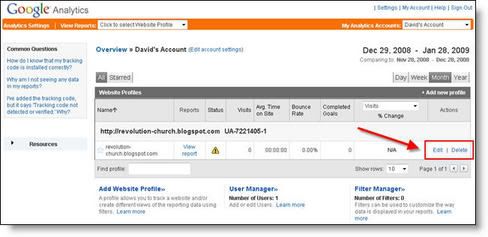

Assuming you pasted the code in there as instructed above, GA will find the new code and begin tracking everything on your blog. If you are still having problems, it’s most likely something to do with GA and you should read their help guide to troubleshoot your problem.

The message seen here, “Waiting for Data” means you have correctly setup GA and data is being gathered! Click on the top left Google Analytics logo and it will take you back to your dashboard. From there click on the “View report” link and that’s where all your very important Blogger visitor data will start appearing!
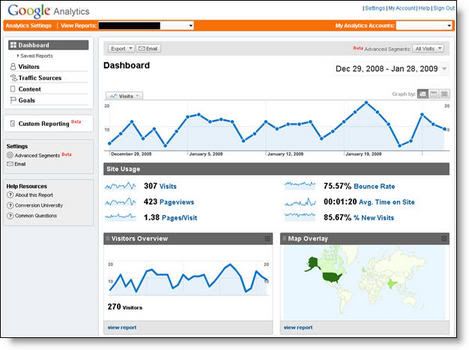
Now it usually takes an hour or so before you will see any data (maybe longer if you don’t get much traffic to your blog) so please be patient. Trust me, you’ll be logging in at least once a day just to see how much traffic your blog is getting. It’s very addicting and powerful information to learn from. You’ll be surprised which posts are your most popular and what countries people are coming from to read your blog.
Google Analytics is very powerful and we have just learned how to install it into your Blogger template. We haven’t even scratched the surface on the features and reporting it can do. For most Bloggers, this will be enough. Data will be collected and you will just review it. Others with more in-depth goals (like selling products or services, creating a sales funnel, etc) will want to spend more time learning GA. Hope you enjoyed the tutorial and don’t blame me for your new found addiction!
How to add Sexy Social Bookmark to your page (blogger)
About three days ago I am walking around the web and find a good tutorial about adding social bookmarks. Actually, about it, many blogger have written. But, I have never found it with something sexy. Yes, It has a short title "add is sexy", very stylist and also sexy.... :). Please see the screenshot below.
They will try to explain about how to add that in blogger.
pls visit this site for introduction....allblogtools.com just follow the instruction... then download the file bellow for image...
Download this file for image
30 minutes (9 Ways to Improve Blog Traffic)

1. Create link clusters within your blog
A link cluster is a group of links that you can point at a post or page to improve its search engine ranking. Let’s say you have a post that’s ranked for ’stupid business ideas’. Edit 10 of your other posts to create links (using ’stupid business ideas’ as the anchor text) to the ’stupid business ideas’ post and you will surely move up in Google for that keyword. This process can be implemented in about 10 minutes and can be used for any keyword your site ranks for or is trying to rank for.
2. Rework HTML title tags of trafficked posts
By watching your stats, you can often identify posts that get search traffic from a keyword, even though the keyword isn’t listed in the HTML title of the post. By editing your posts’ HTML titles to add the keywords they cover, you can strengthen the rankings and therefore the traffic that the post generates. You can easily make a difference with this method in less than 20 minutes. This method combines very well with #1.
3. Invite your readers to connect with you on StumbleUpon and Facebook
You can never ever have too many friends on SU and Facebook. Inviting existing readers to find you on these services with a post should take less than 20 minutes.
4. Save your best posts for the best times of the week
Writing a home-run post on a Saturday afternoon will probably happen from time to time. However, does your blog have good traffic on Saturdays? Analyzing your blog’s stats to determine when it naturally has the most traffic can get more eyes on a great post, which will translate to more social votes and more links. If you have created the post of your life, wait for a good day to publish – it will cost you about 1 minute on a later date to put it up.
5. Edit your post one more time
How can you improve your title? How can you improve your first paragraph? Small details in your post, especially in the beginning of your post, can make an enormous difference in its ability to draw social traffic and links. You can definitely improve your title, first paragraph, formatting, and grammar within 30 minutes.
6. Stop writing about yourself. Start solving problems
Surfers become readers when a blog provides something that is wanted. A casual visitor may read your blog because they find training, answers to problems, entertainment, or something else they want. This more than likely will mean that they won’t want to read about you, your girlfriend, your cats, your kids, or your catastrophes (unless you have a personal blog that your friends read). Discontinuing the off-topic posts will help you to develop more repeat traffic and takes exactly 0 minutes to implement.
7. Subscribe to the feeds of your industry’s major players
That way, you won’t miss important news releases. When news breaks in your industry, there will be a lot of extra traffic searching for information on the event. Adding your thoughts will almost always generate extra traffic. Subscribing to the feeds of your industry’s top sites should take no more than 15 minutes.
8. Give a great post to a prominent blog
Let’s say that you took the time to write something great. Donating your post to a great blogger can help you to create a win-win. The great blogger gets a great piece of content that will bring him social traffic and links and you can create exposure for your name and brand. Emailing your post to a great blogger or blog takes less than 10 minutes.
9. Answer your email and comment questions
Nothing will show a reader that you care more than answering an question (even if you have already answered that question 100 times on your site). Why do people read your blog? Because you solve their problems. Why will they come back again and again to your blog? Because you solve their problems. Answering a person’s email or comment question should take less than 5 minutes.
The Importance of Blogging..

EARN MONEY FROM YOUR WEBPAGE
GET INCOME FROM YOUR WEBPAGE
Turn your valuable website traffic into cash.
Work online and join our free money making partner program.
We offer the most pay-per-click rate to help maximize your
income stream.
Join our cash making program absolutely free and 100% risk free.
Establish a constant stream of cash
Our money earn program
enables you to generate a constant stream
of money, all around the clock.
Giving you more time to focus on other tasks.
You'll even be making money while you not working!
Get paid after you stop working
Set up many new revenue incomes
each and every minute.
Get paid after you not working or even retire at an early age with a
broad revenue stream.
Do this once and get profit over and over again.
It's best time to create
mind-blowing
new levels of profit and prosper on the Internet.
Start collecting steady affiliate revenue
This earning money system really
can make you money on the same day.
Begin collecting steady partner revenue with
almost no effort at all. This is a profitable revenue
opportunity, the chance for you to build a steady, trustworthy,
long-time profitable business.
Fast Track To Fat Loss Imagine looking in the mirror and seeing a thin, healty person staring back at you!

Millions of Customers
Reach millions of shoppers looking for products and services.
Our auditory is constantly growing and now it's over 25 million unique visitors every month.
We send traffic from trusted local and international promotion sites, which bring potential
customers from North America, Western Europe and upcoming markets.
Get More Hits, Get More Customers...

Increase your web-site search engine rankings
Showing up on search engines is one of the most important strategy to increase web-site
traffic and show your product or service to individuals that might be interested in your product.
Most of the big search engines use a software to determine your web-site ranks.
They know how many websites are linking to your web-site; more links and hits
better rank for your website.
Get Better Rank...

Get More Shoppers, Get More Sales!!!
With no constant stream of shoppers you cannot have stable everyday income.
You cannot get revenue if no one comes to your website. You have to have shoppers
to see your web-site, every day, 24 hours!
Our company helps more than 30,000 customers get more shoppers from Internet.
You will get more sales by receiving thousands of real interested customers to see your website.
More Shoppers...
ads


